
Timeline
The day view is the foundation surface. Everything else is built from the same captured blocks.
The flow opens at 4-minute detail. Use the Flow detail control to switch between 3, 4, 5, and 6-minute views, then switch between Category and Productivity color modes to answer different questions without changing the underlying activity.
How to read a block
Section titled “How to read a block”- Focus is confirmed work: coding, writing, design, study, or the activity you told drifty matters.
- Neutral is necessary but not the main work: settings, file management, short lookups.
- Drift is confirmed distraction: social, entertainment, shopping, or a site that pulled you off the task.
The color language matches the app: olive for focus, warm brick for drift, muted stone for neutral.
What sits around the timeline
Section titled “What sits around the timeline”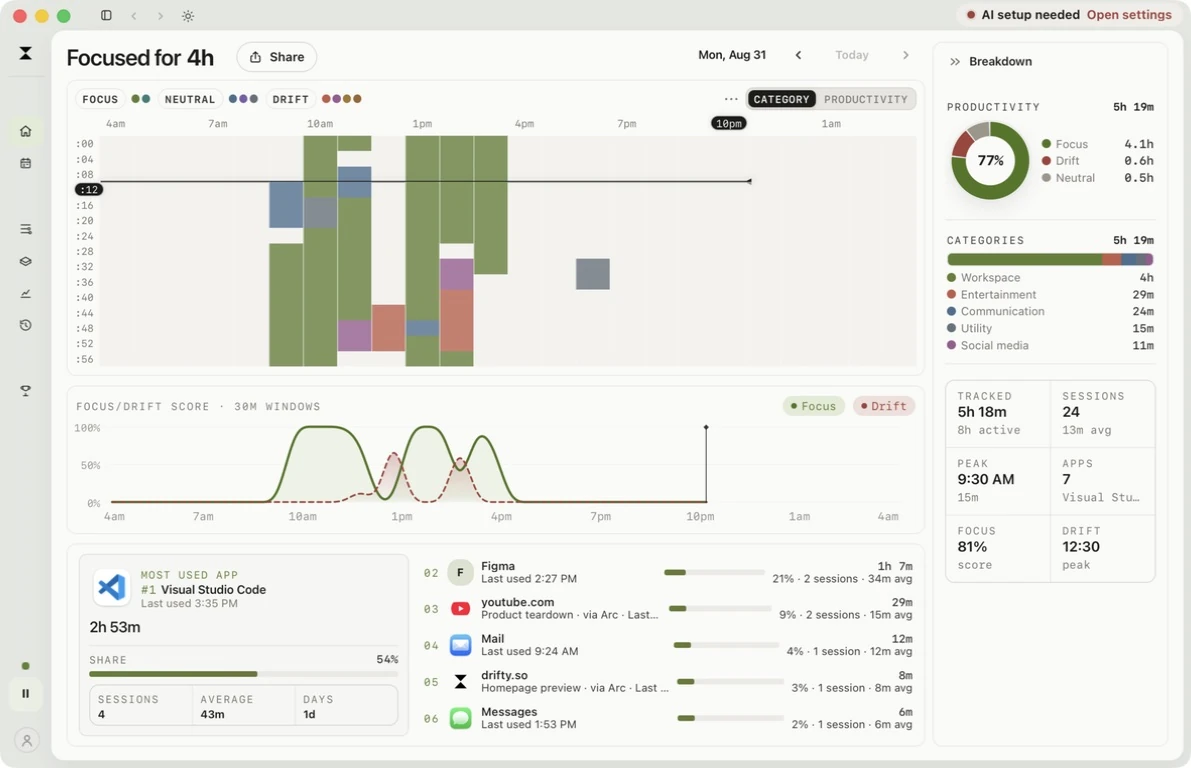
Your Day keeps the flow beside a productivity ring and category breakdown, with the focus/drift score and app usage below. Use the flow to see sequence. Use the breakdown to see proportion. The color mode control switches between Category, Productivity, and Project views of the same captured blocks.
Same-app context
Section titled “Same-app context”drifty is meant to understand the work, not just the app name. Visual Studio Code can be a landing-page edit in one hour and a side project in the next. Slack can be a work thread or a drift. Window title and site context are what make that distinction possible.
On Mac, if Accessibility is off, the timeline still fills at the app level, but those distinctions get coarser. Windows uses its native foreground-window APIs instead of this macOS permission.
To search or delete a specific local session, use History. To change what a block was, use Correct classifications.